
Map filters
Filters decide what appears on the map. The map can show a lot at once, which gets messy fast, so every guide here starts from an empty map and builds up from there, adding only what you want to see.
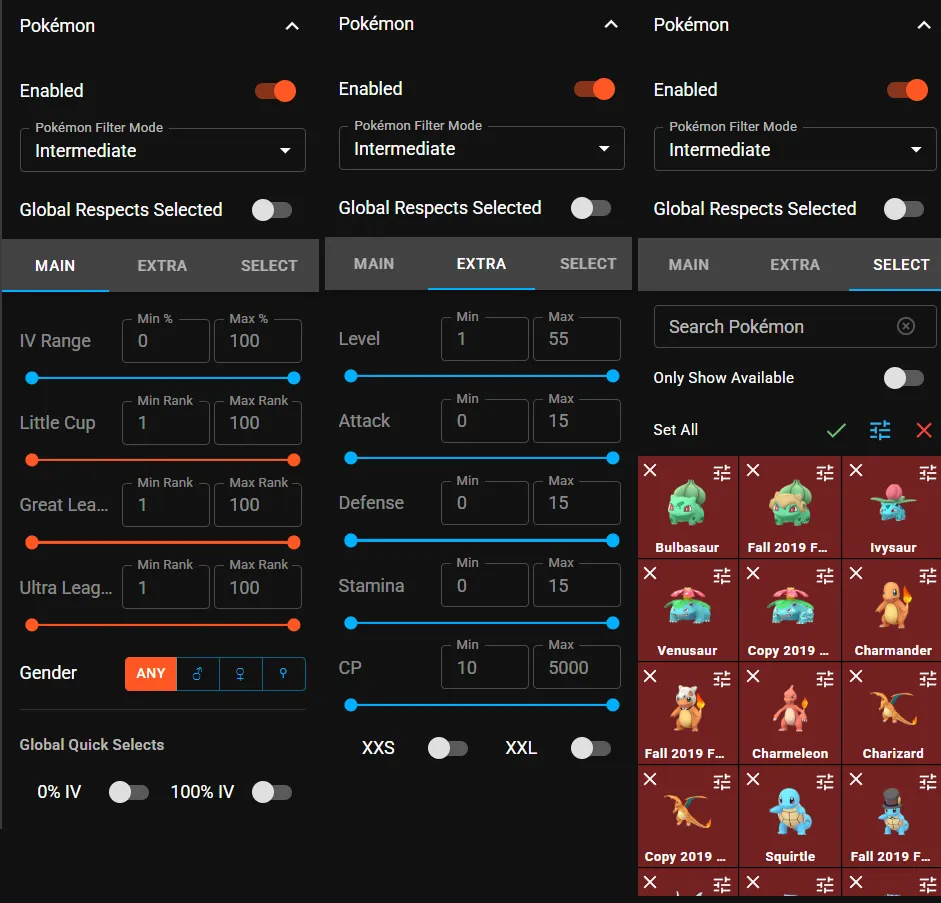
Pokémon filter modes
Section titled “Pokémon filter modes”The map has three ways of filtering Pokémon. You can switch between them with the Pokémon Filter Mode option in the map’s Pokémon settings:
| Mode | Best for |
|---|---|
| Basic | Picking Pokémon and applying one global filter to all of them. |
| Intermediate | Setting filters globally and per Pokémon (the traditional way). |
| Expert | Typing your own filter queries for full control. |
Words you’ll see
Section titled “Words you’ll see”- IV: a Pokémon’s hidden stats (Attack, Defense and HP), each from 0 to 15. A 100% IV Pokémon (“hundo”) has 15/15/15.
- Size: from XXS to XXL. Bigger is better for PokéStop Showcases.
- Gender: matters for some evolutions, like Gallade or Froslass.
- Great / Ultra League rank: how close a Pokémon’s IVs are to the best possible for that PvP league. Rank 1 is the best.
Your filters are saved in this browser. Once you have a setup you like, make a backup.
Filter guides
Section titled “Filter guides” Find XXL Pokémon Show only XXL Pokémon on the map, for one species (for Showcases) or for everything, and get an alert when one appears.
Filter by gender Show only male or female Pokémon on the map, for gender-specific evolutions like Gallade, Froslass or Vespiquen.